Ergo CRM
A complete sales, marketing and service CRM built in house. It runs with no build step and no backend (open it and it just works), and the same codebase becomes a multi-user team workspace when you connect it to one. It’s also the clearest example of what a bespoke management system from us looks like.
Problem
Most teams are paying per seat for a CRM they use a fifth of.
The big platforms are priced for their largest customers and configured for them too. Smaller teams inherit the complexity, pay the per-seat bill, and still end up keeping the parts that matter in a spreadsheet.
- Per-seat pricing that punishes adding the whole team
- Months of configuration before it fits how you actually sell
- Your customer data living inside someone else’s platform
- Agencies and operators with no way to offer a CRM under their own brand
Solution
One codebase. Your brand, your stages, your data.
Ergo CRM is a full sales and account management system that you own outright. Rebrand it from a settings screen, reshape the pipeline to your process, and run it standalone or as a shared team workspace. Nothing is metered and nothing is per seat.
- Rebrand the workspace name, accent colour, currency and locale without touching code
- Rename, recolour and reorder pipeline stages to match how you actually sell
- Runs standalone with zero backend, or as a shared multi-user workspace
- Every record writes through one data layer, so attaching your own API is a contained change
What it does
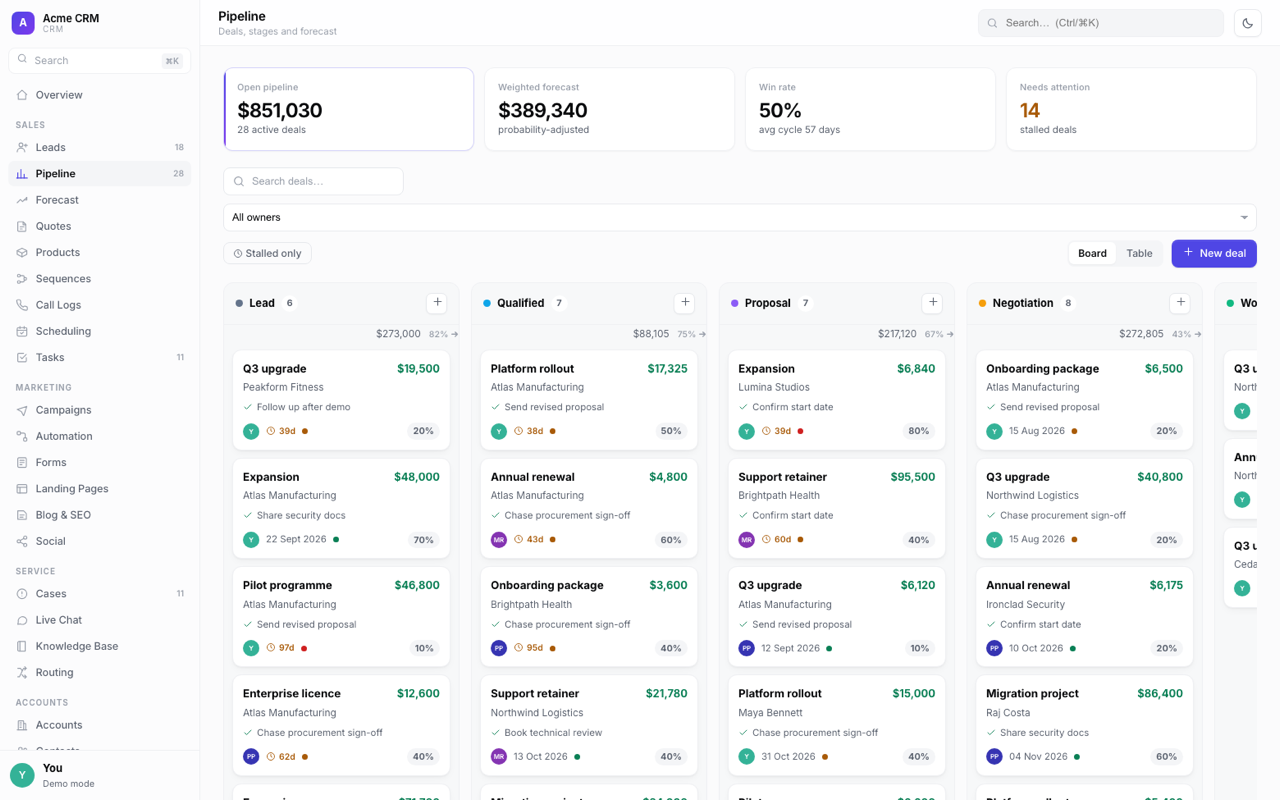
Pipeline
Drag-and-drop kanban with weighted forecasting, win rate, average cycle length and stalled-deal flagging. Board or table view.
Sales stack
Leads, quotes, products, sequences, call logs with click-to-dial, scheduling and tasks. The whole journey from first contact to a closed deal.
Accounts and contacts
Companies and people, each with a detail drawer and a live activity timeline that pulls together every interaction.
Marketing and service
Campaigns, automation, forms, landing pages, blog and social on one side; cases, live chat, knowledge base and routing on the other.
Integrations hub
Connectors for telephony, meetings, email, messaging, finance and automation. Enabling a telephony connector turns every phone number in the app into one-click dial.
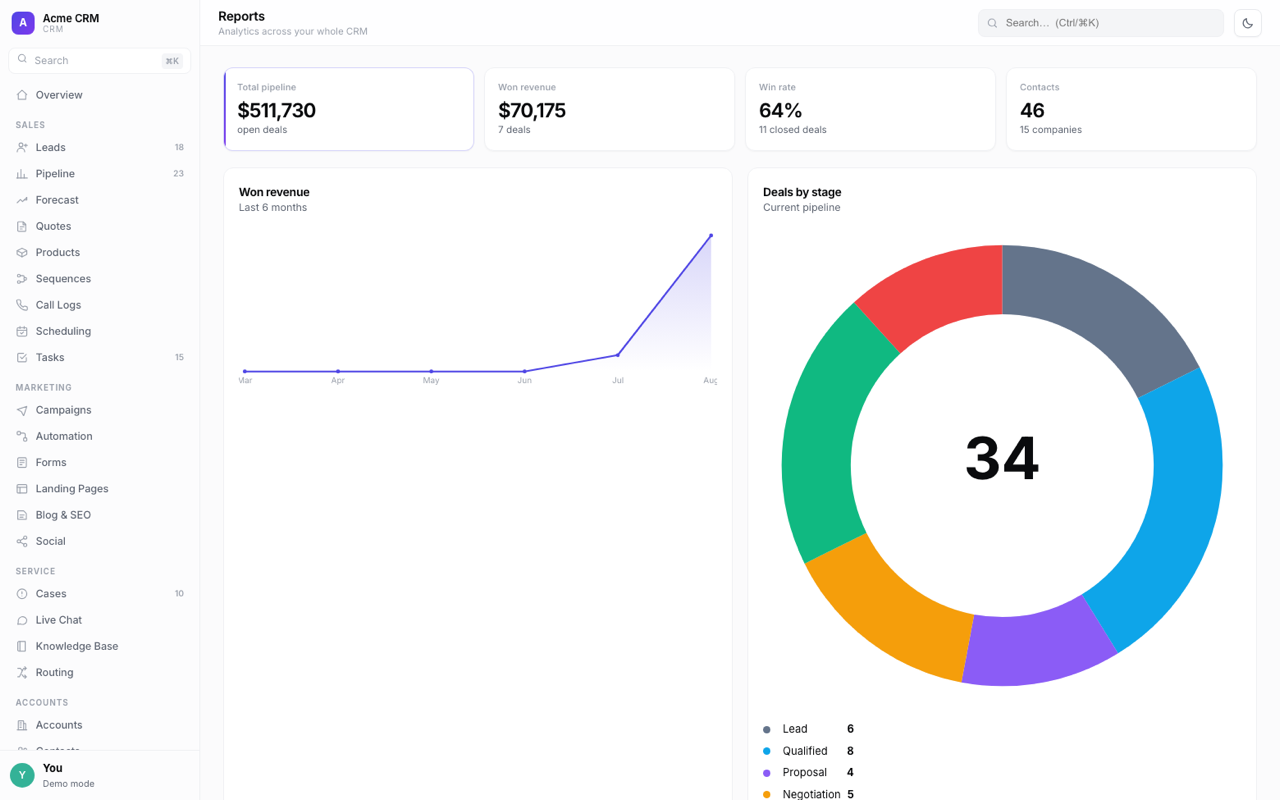
Reporting
Pipeline, won revenue, win rate, deals and contacts by stage, calls per month and an owner leaderboard. Charts are drawn by hand in SVG, so there’s no chart library and nothing loaded from elsewhere.
Deal and lead scoring
Transparent, rule-based scoring on engagement, pipeline value, stage and recency. Every score shows the rules that produced it, so a rep can see exactly why a deal ranks where it does.
Built to live in
Light and dark themes, global search on Ctrl/⌘K, CSV import and export, full JSON backup and restore, keyboard-accessible modals, and a layout that holds down to a phone.
What it looks like to actually use
Five things you would do in a normal week, shown moving rather than described.
Move a deal, and the forecast moves with it
The pipeline is a drag-and-drop board with the maths attached. Drop a deal into the next stage and the weighted forecast, the stage totals and the win rate all update on the spot. No refresh, no separate report to run.
- Probability-adjusted forecast, updated as you work
- Stage totals and counts recalculated on drop
- Stalled deals flagged so nothing goes quiet unnoticed
- Board or table view, whichever suits the review
Illustration of the pipeline board as a deal moves stage.
Every phone number becomes a call button
Enable a telephony connector and each number in the app turns into one-click dial. The call is logged against the contact when it ends, so activity gets recorded by the act of doing the work rather than by remembering to write it down afterwards.
- CallSwitch One, Twilio, Aircall or RingCentral
- Calls logged automatically against the contact
- Duration and direction captured without a form
- Feeds the calls-per-month report and the owner leaderboard
Sam Okafor
Northgate Property Group
Call log
Illustration of click-to-dial. Requires a telephony connector to be configured.
The follow-ups happen whether you remember or not
Sequences run multi-step cadences across email, calls and messaging on a schedule you set. Most deals are lost to silence rather than to a competitor, and this is the part that removes the silence.
- Multi-step cadences with per-step timing
- Email, call tasks and messaging in one sequence
- Progress visible per contact, not buried in an inbox
- Reusable across onboarding, chasing and renewals
Post-viewing follow-up
4 / 4 sent
Illustration of a four-step cadence running.
Scoring that shows its working
Deals and leads are scored on engagement, pipeline value, stage and recency. Every score opens up into the rules that produced it, so a rep can see exactly why something ranks where it does, and push back on the specifics rather than shrug at the whole thing.
- Deterministic weighted rules, not a model
- Every contributing rule shown alongside the total
- No per-call cost and no data sent to a provider
- Rules are readable, so the logic can be argued with
Q3 upgrade · Northwind
Why this score
Deterministic rules. No model, no per-call cost.
Illustration of a score being assembled from its rules.
Rebrand it in a settings screen, not a fork
Workspace name, accent colour, currency and locale are settings. The whole interface follows immediately. That’s what makes it sellable under your own name, or usable in front of a client without explaining whose software it is.
- Name, accent colour, currency and locale from Settings
- Pipeline stages renamed, recoloured and reordered
- Team members managed in the same place
- No code change and no separate build per brand
Illustration of the branding settings applying live.
One CRM, configured for the trade you’re in
The pipeline, the stages and the connectors change. The software doesn’t. Here’s what we’d set up for each, and what it wouldn’t do for you.
A pipeline shaped like a property transaction, not a software sale.
Applicants arrive from four portals and a phone that never stops. Viewings, offers and chains are tracked across a whiteboard, a shared inbox and someone’s memory, and the thing that loses a fee is almost always a call that nobody made.
Stages that match the journey
Rename and reorder the pipeline so it runs Enquiry to Completion instead of Lead to Closed Won. Weighted forecasting then reads as expected fee income, and stalled-deal flagging surfaces the chain that has gone quiet.
Every number is one click to dial
Connect a phone provider (CallSwitch One, Twilio, Aircall or RingCentral) and every phone number in the app becomes a call button, with the call logged against the applicant automatically.
Landlords and their portfolios
Accounts support a parent company relationship, so a landlord sits above the properties and contacts beneath them. Each record carries its own activity timeline.
Maintenance as cases
The service side, with cases, routing and a knowledge base, handles reported issues with an owner and a status, rather than another inbox folder.
Chasing that runs itself
Sequences handle the follow-ups that decide instructions: after a valuation, after a viewing, and the compliance documents nobody wants to ask for a third time.
Enquiry capture
Forms and landing pages take portal and website enquiries straight into the pipeline with an owner attached, instead of into a shared mailbox.
Pipeline we’d set up
- Enquiry
- Valuation booked
- Instructed
- Viewings
- Offer received
- Under offer
- Exchanged
- Completed
A suggestion, not a fixed template. Stages are renamed, recoloured and reordered from Settings.
Connectors that matter here
- CallSwitch One
- Twilio
- Xero
- GoCardless
- Microsoft 365
What it won’t do. This is a CRM, not a lettings ledger. It doesn’t hold rent accounts, client money, statements or reconciliation. That belongs in your accounting system, and the Xero, QuickBooks and GoCardless connectors are how the two talk to each other. If you need the ledger itself, that’s a build, and we’d scope it as one.
As it actually looks
Captured from the running application, not mocked up.
Built the way we build bespoke systems
- Frontend
- Vanilla JavaScript · No framework · No build step
- Data layer
- Single store with pub/sub · localStorage · Swappable adapter
- Multi-user mode
- Netlify Identity · Netlify Blobs · Serverless function
- Charts
- Hand-drawn inline SVG · Zero dependencies
Available
- Core CRMPipeline, accounts, contacts, tasks and reporting.
- Sales stackLeads, quotes, products, sequences, call logs and scheduling.
- Integrations platformConnector framework with a capability hook per provider.
- Multi-user workspaceShared team workspace behind authentication.
- Live connector wiringMoving connectors from configured to transacting, one provider at a time.
Make it yours
Want Ergo CRM, branded as you?
We rebrand it, reshape the pipeline to your process, connect it to the tools you already run on, and deploy it. Or we build you something else entirely.